

| [ Team LiB ] |
|
Recipe 5.5 Creating a JSP from Scratch as a JSP DocumentProblemYou want to create a JSP document in an XML editor's tool. SolutionOpen up your XML editor of choice and create the JSP using only XML elements. DiscussionA JSP document is a namespace-aware, well-formed XML file that contains JSP standard actions (such as jsp:include and jsp:useBean), custom actions (such as JSTL custom tags), and the XML equivalents of JSP directives. Table 5-1 specifies the XML equivalents for common JSP directives. Write the JSP document in an XML editor, preferably one where you can check its well-formedness. The JSP document has to be a well-formed XML document to be eligible for placement into a JSP container and execution.
This recipe shows a simple JSP page and its XML equivalent, then repeats the comparison with the addition of a custom tag and a runtime expression for a JSP element attribute. Example 5-9 is a simple file in JSP page syntax showing the web server's local time. Example 5-9. A simple JSP page-syntax file<%@page contentType="text/html"%>
<%@page import="java.util.Date"%>
<html>
<head><title>Welcome to the Web</title></head>
<body>
<h2>Welcome to the Web</h2>
The server's local time is <%=new Date( ) %>.
</body>
</html>
This JSP has two page directives and a JSP expression that displays a date and time string on the browser page. Figure 5-1 shows the execution of this page in a browser. Figure 5-1. Simple JSP before XML conversion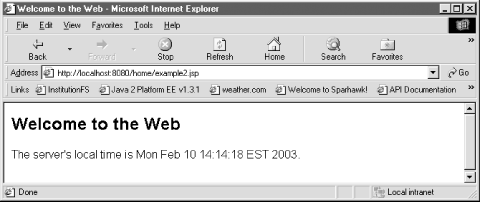 This page can be converted into a JSP document by cutting and pasting the code into an XML editor and replacing non-XML constructs with XML elements. Example 5-10 is the JSP document equivalent of Example 5-9. Example 5-10. A simple JSP document as well-formed XML<jsp:root xmlns:jsp="http://java.sun.com/JSP/Page" version="2.0">
<jsp:directive.page contentType="text/html"/>
<jsp:directive.page import="java.util.Date"/>
<html>
<head><title>Welcome to the Web</title></head>
<body>
<h2>Welcome to the Web</h2>
The server's local time is <jsp:expression>new Date( )</jsp:expression>.
</body>
</html>
</jsp:root>
Example 5-10 has jsp:directive.page elements instead of traditional JSP directives, which are not valid XML elements because of the <%@ syntax. Anything in a JSP page that uses <%-style delimiters cannot be used to distinguish JSP elements, because then the JSP document will not pass an XML well-formedness test. Example 5-11 is a more complex JSP page with a taglib directive that specifies the core tag library from JSTL 1.0; the page also uses Expression Language (EL) code. Further, the page has a jsp:useBean element that sets a java.util.Date variable dateString to page scope. Example 5-11. A JSP page presenting a complex XML conversion<%@page contentType="text/html"%>
<%@ taglib uri="http://java.sun.com/jstl/core" prefix="c" %>
<html>
<head><title>Welcome to the Web</title></head>
<body>
<h2>Welcome to the Web</h2>
Hello, <c:out value="${param.firstName} ${param.lastName}"/><br><br>
<jsp:useBean id="dateString" class="java.util.Date"/>
The time is <c:out value="${dateString}" />.<br><br>
The value of 10 + 24 + 35 = <c:out value="${10 + 24 + 35}" />
</body>
</html>
Example 5-12 is the same JSP page converted to a JSP document. Example 5-12. Referring to tag libraries (taglibs) in a JSP document<jsp:root xmlns:jsp="http://java.sun.com/JSP/Page"
xmlns:c="http://java.sun.com/jstl/core" version="2.0">
<jsp:directive.page contentType="text/html"/>
<html>
<head><title>Welcome to the Web</title></head>
<body>
<h2>Welcome to the Web</h2>
<jsp:text>Hello </jsp:text>
<c:out value="${param.firstName} ${param.lastName}"/><br></br><br></br>
<jsp:useBean id="dateString" class="java.util.Date"/>
<jsp:text>The time is </jsp:text><c:out value="${dateString}" />.
<br></br><br></br>
<jsp:text>The value of 10 + 24 + 35 = </jsp:text>
<c:out value="${10 + 24 + 35}" />
</body>
</html>
</jsp:root>
In a JSP document, any tag libraries can be included as namespace attributes, such as in the jsp:root element, as shown here: <jsp:root xmlns:jsp="http://java.sun.com/JSP/Page"
xmlns:c="http://java.sun.com/jstl/core" version="2.0">
The jsp:text element can be used to contain any template data in the JSP document. You can use the JSP standard actions such as jsp:useBean and custom tags like c:out with the same syntax used in a JSP page. Figure 5-2 shows the browser output of the JSP document in Example 5-12. This page was requested by using this URL: http://localhost:8080/home/example_xml2.jsp?firstName=Bruce&lastName=Perry. Figure 5-2. Output from Example 5-11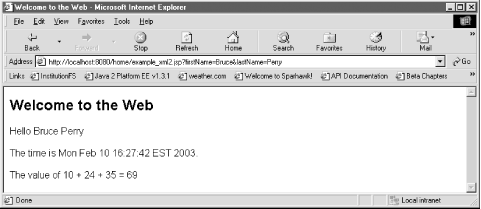 Here is what the HTML source code looks like, if you chose
"View <html><head><title>Welcome to the Web</title></head> <body> <h2>Welcome to the Web</h2> Hello Bruce Perry<br/><br/> The time is Mon Feb 10 16:20:05 EST 2003.<br/><br/> The value of 10 + 24 + 35 = 69 </body></html> See AlsoRecipe 5.6 on generating an XML view from a JSP; Chapter JSP.6 (JSP documents) of the JSP 2.0 specification; Chapter JSP.10 (XML views) of the JSP 2.0 specification.  |
| [ Team LiB ] |
|

 Source" from the
browser menu (with some carriage returns added for readability):
Source" from the
browser menu (with some carriage returns added for readability):